Kindle Apps for Preschoolers
You can start reading with the Kindle app on a phone or tablet, or with a supported Amazon device offering parental controls and Kids+ access. Before committing, check which screen you have. Monochrome Kindles show illustrations in greyscale, while Kindle Colorsoft models and Fire tablets show color. Check a book preview on the specific device to see whether its layout is comfortable to read.
The distinction that decides everything
It is easy to get confused between a dedicated Kindle e-reader, the Kindle reading app, and Amazon Fire tablets. Dedicated Kindles come in monochrome or color Colorsoft models, while the Kindle app works on various compatible phones and tablets. Fire tablets are full-color devices that run apps, and the Kids editions often come bundled with a protective case and an introductory subscription. Just keep in mind that a Colorsoft is a dedicated reader, not a general-purpose app tablet.
If a picture book relies on color to tell its story, the screen you choose matters. Both Kindle Colorsoft readers and full-color tablets can display those colors, but they use different types of screens. Since illustrated editions often have specific layouts, it is better to preview a book on your own device rather than assuming it will look right. Traditional monochrome Kindles will display those same pictures in greyscale.
A monochrome Kindle can actually be quite useful as your child grows into text-heavy chapter books. For preschooler picture books, the main thing is whether you and your child can comfortably see the illustrations and read together. Color e-ink readers are also an option; e-ink doesn't always have to be black-and-white.
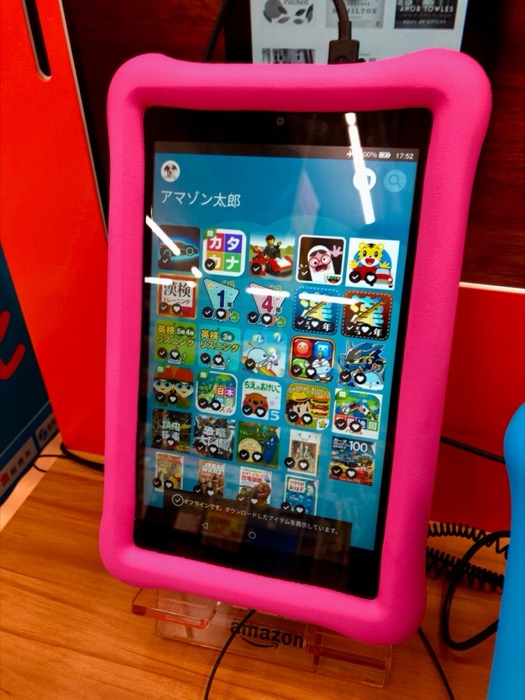 Color tablet — illustration survives
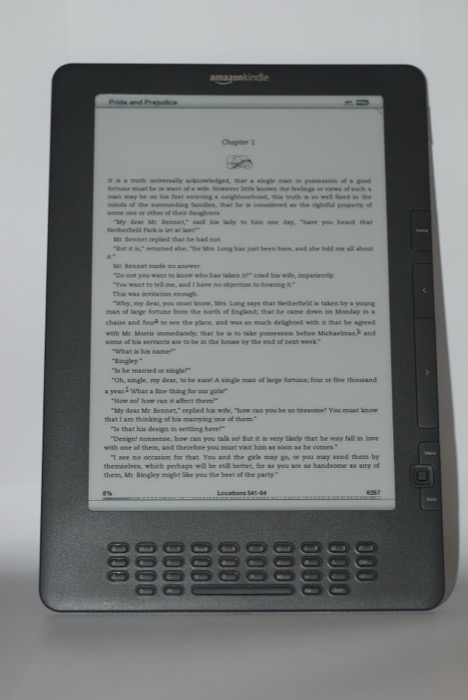 The pictured Kindle DX has a monochrome screen.
Look at Fire Kids tablets on AmazonAffiliate link
Kindle apps for preschoolers: what to actually install
A simple reading setup starts with the Kindle app, which opens any Kindle books you've purchased or borrowed. If you want a curated library and parental controls, Amazon Kids+ is an option, but keep in mind that the available content depends on your specific device. Many Fire Kids tablets come with an introductory Kids+ subscription, so be sure to check how long that lasts and what the renewal terms are before you commit. It's also important to remember that Kids+ isn't a general-purpose reading app that works interchangeably on every phone or tablet.
On a compatible Kindle, a child profile can contain books you have chosen without requiring a Kids+ subscription. After purchasing a book on the parent account, use the Amazon Kids Parent Dashboard: choose the child in the Content menu and add the purchased title. Open the child profile to check that the intended edition appears. Adding a profile to an existing Kindle provides the same parental controls as a Kids device; the Kids bundle adds items such as the case and an included subscription period. Amazon’s profile and sharing instructions
Before you add another app to your device, look closely at what your child is actually doing in it. A game that happens to include letters isn't automatically a reading lesson. Make sure you're leaving room for reading aloud together and talking about the stories. For a broader look at how literacy develops, our guide to when children learn to read and what actually predicts it explains the bigger picture.
Check what Amazon Kids+ includesAffiliate link
Free Kindle books for preschoolers, and the catch
It helps to keep three different offers separate: free-to-keep Kindle titles (which can include publisher promotions or public-domain classics), Prime Reading (a rotating selection available with a paid Prime membership), and Kindle Unlimited (a separate paid subscription to its own specific catalog). Just because a book is included with a subscription doesn't mean it is free without one.
Availability changes constantly, so you can't guarantee a familiar picture book will show up in a free or subscription catalog. Always search for the exact title and check the specific offer before you promise a book to your child. Our board book list can help you find titles to look for, but that doesn't mean those specific editions are available for free on Kindle.
Is Kindle Unlimited worth it for a preschooler?
A Kindle Unlimited subscription might make sense if it includes the books your child actually wants to read and you use it enough to justify the cost. It’s worth browsing the catalog first; reading a lot of books doesn't help if your child's favorites aren't in there. If your child just wants to read the same few books over and over, you might find it better to just own those specific favorites. There isn't an automatic saving just because you've subscribed.
Check the edition as well as the title. Open a sample and try the smallest speech bubble or caption, then check a full illustrated spread. If you need to zoom and pan repeatedly to follow the story, a larger screen or the print edition may suit that book better. A readable chapter-book sample does not establish that a fixed-layout picture book will work equally well.
See what Kindle Unlimited costsAffiliate link
The importance of reading together
Before a journey, open the books you intend to use while connected, then try them with the device disconnected. That simple check catches a book still waiting to download before you are on a plane or away from Wi-Fi. Set the brightness and orientation before beginning the story so device adjustments do not interrupt every page.
Regardless of whether you're using a physical book or a screen, the magic happens in the interaction: pointing at pictures, asking questions, and letting the story wander. Paper books tend to make it easier to stay focused on the narrative, whereas a tablet can sometimes present distractions like menus or other apps. If you're using a screen, keep the setup simple and stay engaged to help your child stay on track. A screen can definitely support shared reading if you make the space for it.
The practical distinction is between actively sharing a story and handing over a device without support. A tablet can be a space-saving second library when traveling, while paper books avoid menus and app distractions. Whichever format you use, leave room for reading and talking together.

Common questions
- Can you read picture books on a Kindle?
- Yes, but it depends on the specific model and how the book is laid out. A monochrome Kindle shows illustrations in greyscale, whereas the Kindle Colorsoft and Colorsoft Kids show them in color. You can also use the Kindle app on a color-capable phone, tablet, or Fire tablet. Preview the illustrated edition on the device you plan to use, especially since dedicated Kindle readers won't run general tablet apps.
- What Kindle apps should a preschooler have?
- Start with one simple setup: use the Kindle app for compatible Kindle books, or use a supported Amazon device with Kids+ if you want a curated library and parental controls. Just remember that Kids+ content varies by device. A preschooler doesn't need a massive collection of different reading apps; it's better to choose something you can actually use and talk about together.
- How do I find free Kindle books for preschoolers?
- There are three main ways. You can find free-to-keep classics and publisher promotions in Amazon's free Kindle listings. If you are already a Prime member, you have access to a rotating selection through Prime Reading. There is also Kindle Unlimited, which requires a separate monthly subscription but offers a much larger catalog. Keep in mind that "free" and "free with a subscription" are different, even if they look similar while you're browsing.
- Is Kindle Unlimited worth it for kids?
- It can be worth it if the subscription includes the specific books your child wants and you use it enough to justify the monthly cost. Browse the current catalogue before signing up. If a child returns to the same few favorites, buying or borrowing those specific books may be more practical.
- Is a tablet as good as a paper book at this age?
- Both formats can work for shared reading. Paper is wonderful for staying focused on the story, while a tablet is incredibly convenient for travel since you can carry so many books at once. If you are using a screen, the key is to make room for conversation, pointing, and questions rather than letting the device's controls or other apps become the main attraction.